What is the general goal of the feature?
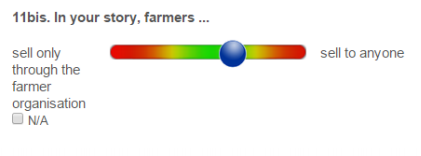
To have a slider widget with text instead of numbers at the ends of the range bar and without the label of the numeric value on top of the bar. So basically it would be a slider allowing respondents to indicate a 'preference' in between 2 text values (more of A, more of B or somewhere in between). This would give a numeric value as output (without showing the label of this output on the screen). So, it would be an adjusted form of the 'range widget'
What are some example use cases for this feature?
This feature could be used for quantifying the output of qualitative questions. Respondents can be asked to position themselves or their story on a continuum between 2 opposites. The position of the slider corresponds with a value (which is the output, not shown on the screen). This is a feature which is used to let respondents evaluate their 'own stories'. The respondents position themselves on this continuum by using the slider. Please see the example below:
Thank you all to see this feature request for discussion.
To add more information ... , we used slider with label for likert scale questions types, with label "Strongly Disagree" in one end and "Strongly Agree" in the other end. I will share you the screenshot of the application which was used for PMA2020 projects. Thanks!
How would you envision the colors of the slider being determined? Could these be hardcoded - eg always red at both ends with green in middle, as in your diagram - or would these needs to be configurable per widget? Asking because colors can often convey an implicit bias (eg green=preferable/'good', red=undesirable/'bad') and they would appear to play a not insignificant visual role in your example. Or should the slider be a neutral color? ...
I know the SenseMaker App from Cognitive Edge uses these type of questions. I think they call it 'dyads'.
We are looking for a range rather than values (so, not like a likert scale, but a range from let's say 0 to 100).
Hi, thanks for your feedback. The colors are helpful, but not a first priority as such. I think they could help the respondent in using the sliders (especially visualising the "centre" of the slider bar).
We are looking for a similar feature in ODK. The closest in ODK is the range integer widget, except that we do not want integers, but just extreme values at the end. We intend to use this to measure the degree of agreement or disagreement with less text and without the need to explain what 1,2,3 etc mean. We would want to measure distance from one end as the data of interest. I am not sure if this is the same way @Toon_Driesen will measure the data. In the clinical field, this type of tool is common in pain research as a visual analog scale. @yanokwa - Here is an example forpain (see the third graphic)
I dont believe there anything in the W3C definition of range that restricts it to integers. Indeed (emphasis added):
..Data Binding Restrictions: Binds only the following list of datatypes, or datatypes derived by restriction from those in the list: xsd:duration, xsd:date, xsd:time, xsd:dateTime, xsd:gYearMonth, xsd:gYear, xsd:gMonthDay, xsd:gDay, xsd:gMonth, xsd:float, xsd:double, and xsd:decimal.
Could what you want be accomplished leveraging the existing range control definition, but with the addition of specifying optional labels to be displayed in addition to (or instead of?) the start and endvalues? eg
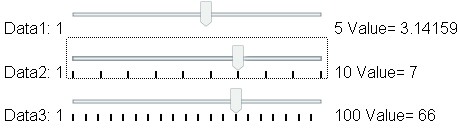
I think with a suitably small step (0.0001) you can effectively make the range 'continuous'... The step simply states the granularity of the actual returned value, and if you are most interested in, say, specifying 0..10 then I dont think the difference between, say, 5.1234 and 5.1235 is really going to be an issue. eg from wikibooks
A 'Data1' widget would seem to be what you are after, right? (provided we can add optional endpoint text labels)
Please note, this is simply the XForm W3C spec definition of range; it doesn't necessarily mean XForm clients like ODK Collect, Enketo, etc fully support it. But my point is that we can probably accomplish what you desire by suitably extending the existingrange control definition (and implementing whatever aspects thereof are current lacking in clients), rather than having to come up with an entirely new control type.
Also to note that the range widget shows the start/end values as well as the selected value. Adding optional start/end labels shouldn’t change this standard behavior. Therefore you’d probably want to add a (new) appearance to, say, hide the 3 values, so that you would only see the labels.
We plan to add configurability to the range question type to make it easier for users to evaluate and select values along a range. Requests for this functionality first came up in this thread and here, and have resurfaced recently.
Allow form designers to specify left and right labels, with full support for translation. For example, you may have “Low” / “High” or “Extremely dissatisfied” / “Very satisfied.”
Configurable ticks
Optionally display ticks or dots along the slider at a smaller interval than the selectable steps. For example, on a 0–100 range, you could set tick intervals at 20 even if the step is 5.
Suggested value
A suggested value (or placeholder) can appear initially to give users a starting point. This would be for display only and no value would be saved to the question until the user interacts with the question in contrast with a default which immediately is saved as the answer to the question.
XLSForm
The goal is to augment the existing range question type.
For a row with type = range and non-empty tick-labelset, the value of tick-labelset MUST match exactly one list_name on the choices sheet.
The name values for that list_name: MUST be numeric strings that are multiples of step or odk:tick-interval between start and end, inclusive.
Hey Aly, this is great! I do have a few questions. I’m curious about the default value since it is set by display-default rather than the default column in the question row. Is the form default ignored in this case or are they both at play? I’m not aware of how the current range widget applies the form default value.
Secondly, can the tick-interval be a decimal value? It looks like step can already be a decimal. Also, would this approach allow you to do a reversed range if needed? (100 - 0 | Happy - Unhappy). I don’t have a clear example of how this would be used but I know it has come up haha . Thanks!
The display-default would only be visible if the underlying value is empty. As soon as the value is set by a default, a calculation, user input, etc, the display-default would no longer be in play. If the user cleared the question value, it would go back to the display-default.
Yes, as long as tick-interval is an exact multiple of step then it can be decimal or integer.
I believe that currently we require the end value to be strictly bigger than the start value. I think we'd want to know about more specific scenarios before considering a change there. In a Right-to-Left language the order would be automatically flipped.
Oh! display-default is how you define the “Suggested Value”. Got it, I missed that connection somehow and thought it was a separate parameter. I totally understand now.
Great!
Understood, the plugin that was developed for us included reverse scales, but it turns out that wasn’t actually a requirement of ours. So never mind on that one but thanks for clarifying the constraints!
We're starting work on this in Collect and are currently targeting an early April release.
Yes, we're trying to come up with naming we can potentially use for other question types as well. @gareth has now suggested placeholder which would be consistent with the HTML placeholder text for text inputs. We're inclined to go with that instead.
We've grouped together a few extensions to range here and I'm realizing we may not understand "suggested value" as well as I thought. I think that came from your team originally @rgraudin, can you say more about the underlying need? Is it to bias users towards a certain value? Make sure they see the handle? Something else?
Hi @LN! The intent is really just to anchor the slider somewhere other than extreme right or left without that placeholder being taken as a meaningful response to the question. If you use the default to anchor the slider in the middle of the scale, the respondent can skip the question(s) without moving the scale and it would appear as if an intentional decision was made.
I don’t think it has to do with biasing the value or that it’s hard to see the slider. I agree that placeholder is a more intuitive naming since it’s a value that’s intended to be replaced by the user.
 New Configuration for range

 Let us know what you think
 . Thanks!