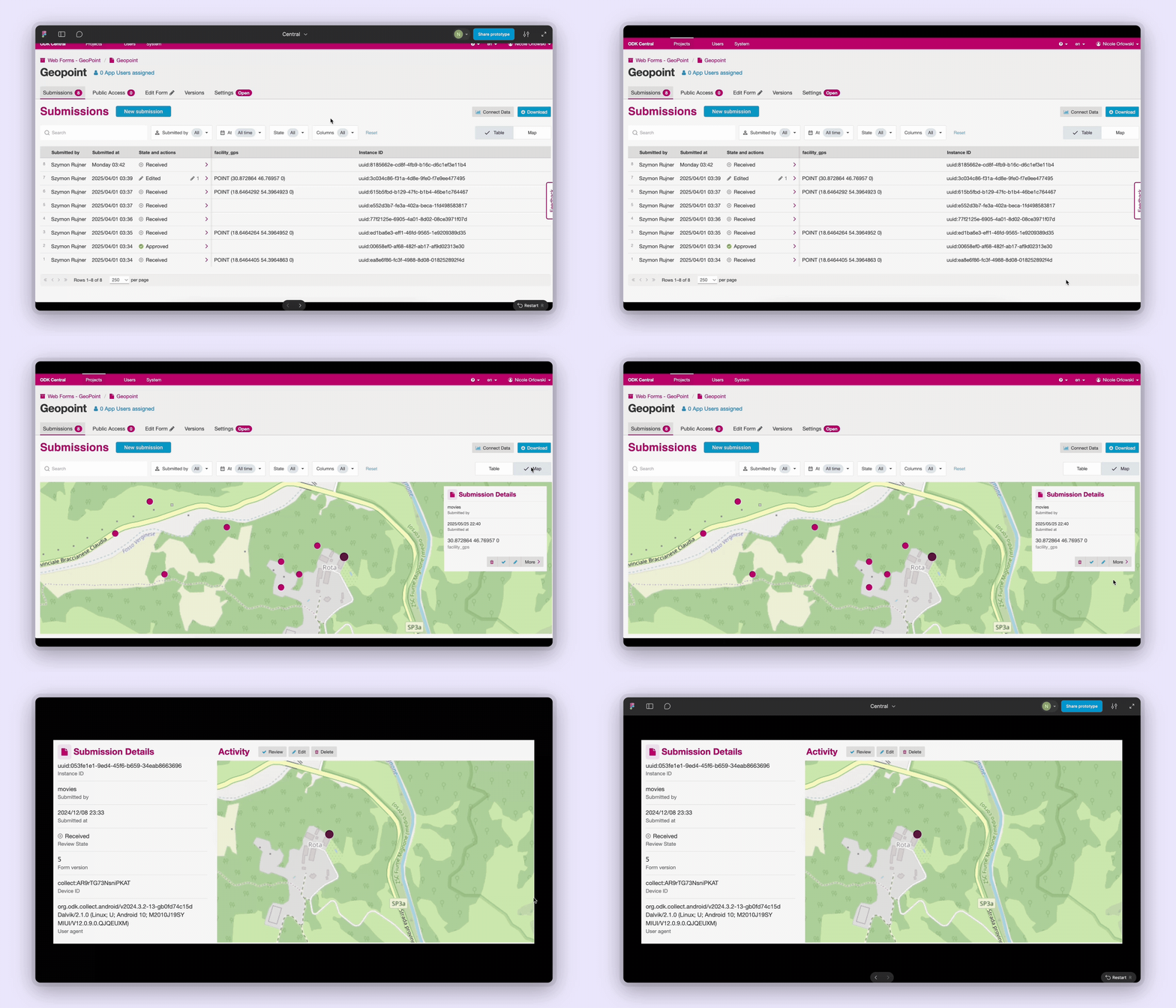
We’re excited to share that we’re starting to design a map view for Submissions and Entities in ODK Central!
We’ve heard from many of you that mapping is a key part of your workflows—whether you're running vaccination campaigns, bed net distributions, household surveys, or any number of other location-based activities. In all of these cases, seeing data on a map helps make patterns more visible and decision-making more intuitive.
Our goal is to bring more of that spatial insight directly into Central. This new map view will complement the existing table view, giving you a more visual way to explore your data.
For Entity Lists, each Entity will be mapped using the geometry property if it exists. This matches how select_one with the map appearance works.
For Submission Lists, each Submission will be mapped using the first geopoint/trace/shape found in the form definition that is outside of any repeat. This is similar to the submission map in Collect (documentation). If you have a form with locations captured in a repeat, you will soon be able to create Entities from those repeat instances and see them on the Entity List map.
As always, we’ll be sharing updates along the way and will be looking for your feedback. Let us know what you’d like to see in a map view—your input will help shape the direction!
Firstly, and importantly, this is great! But you know that your pesky ODK Community is going to push the boundaries...
I wonder if you have thought about (and probably discounted) the possibility of being able to select a geometry to plot rather than use the first. I am just thinking that if there were an opportunity to manually select the column (like a filter) and use that, it might be an even more powerful tool.
I have situations where there are 2 or 3 geometries in a form (non-repeat) that show different aspects of a submission, and maybe I'm not alone (for a change).
And of course being able to plot a subset of the submissions / entities would be even better - I'm sure this is in hand - so we can filter on status, collected since or other properties... That would give a great rapid overview tool to track progress with data collection.
We are planning to use the same filtering capabilities on the table as on the map view (and also planning to expand the filters so that they are consistent both on Entities and submissions)!
To your point on multiple geometries in a form, we've had a lot of internal discussions around making the single point configurable and are going to consider this as something longer term as we learn more about user needs.
You can use a geopoint/trace/shape question type with a calculation that references any form field at the beginning of a form definition to pull up a specific
geometry, even if it needs to be acquired later in form order.
Do you have the same need for configurability with select from map in Collect? And are you able to share what the different geometries in your form represent? Is there one that represents the submission or Entity more than the others?
Multiple geometries can be helpful in viewing different aspects of the data collected, rather than having to rely on one - as an example in one form I use a start POINT an entity LINE (that represents the route) and an end POINT, which are all within the submission, so being able to switch between them would be useful. They represent aspects of a footpath - the calculation you mention would assume that there is one geometry that is 'better' than the others - and I don't think that would always be the case (but if there can be only one, then I could design the form accordingly as you suggest to get the most useful data plotted within Central...
In another form I have a point followed by either another point, a line or a shape (depending on what is close to that reference point) - these represent different features on the ground. Maybe the calculate could coalese these, but the reference point is also important (these often represent grids for sampling, so that might be the priority if trying to observe progress)...
For QuODK plugin I have had to come up the a means of separating different geometry types in an entity into separate layers (QGIS can only deal with one geometry type in a layer) - I had to do that to solve the use cases above...
I also use select_one from map using those different geometry types too - so need to be able to combine different QGIS layers together when generating entities... And they represent different types of features on the ground (to put it in context, the line might be a ditch or drain, an area might be bare earth and a point could be a dam blocking a ditch).
Hope this helps (begin to) explain why I'm so difficult
Starting in Central v2025.3, the submission map is now available! You can now also find it in the documentation.
The Entities map will be available starting in v2025.4, expected mid-December. If you have any feedback around the mapping experience, please let us know.
For now, the map is intended to be a simple alternative representation of the data table to help with spot checking as data is being captured and basic sense making before a deeper analysis pass. Submissions are mapped according to the first geometry they include only. We may eventually make it possible to combine submissions from different forms, Entities and multiple geometries per form.
Sometimes in the Central submission table view I select a subset of columns so I can quickly look/search for values (deselect all, select the field(s) I want in order), as the first displayed 10 fields are usually metadata not of particular interest.
In the map view, the Columns shown filter doesn't currently do anything and the github issue proposes hiding it.
Is a possible alternative that it has the same effect, and for a selected geometry, this selected / ordered subset of fields is what is shown in the popup box, rather than all (non repeat) fields in form order?


 You can now also find it in the